

Introduction
Today, AMD officially announced their latest AM4 chipset, B550. With the launch, new motherboards are released by the major manufacturers.
So, what is in store in the B550 chipset which makes it a worthwhile upgrade from the old B450 ? Well, if you have wanted PCIe 4.0 but were hesitating due to the higher costs, the B550 might be the solution.
So, what does B550 chipset do? Basically it brings PCIe 4.0 to the mainstream. Most importantly, it supports the future Zen 3 architecture processors. You can read from the link below.
So, what is Gigabyte offering on their latest B550 board – B550 AORUS MASTER?

Specifications and highlights of the Gigabyte B550 AORUS Master
- Supports 3rd Gen AMD Ryzen™ Processors
- Dual Channel ECC/ Non-ECC Unbuffered DDR4, 4 DIMMs
- Direct 16 Phases Digital VRM Solution with 70A Power Stage
- Advanced Thermal Design with Fins-Array Heatsink, Direct Touch Heatpipe and Thermal Baseplate
- Ultra Durable™ PCIe 4.0 Ready x16 Slot
- Triple Ultra-Fast NVMe PCIe 4.0/3.0 x4 M.2 with Thermal Guards
- Onboard Intel® WiFi 6 802.11ax 2T2R & BT5 with AORUS Antenna
- AMP-UP Audio with ALC1220-VB and WIMA Capacitors for Rear 120dB SNR
- Blazing Fast 2.5GbE LAN with Bandwidth Management
- USB 3.2 Gen2 Type-C™ & HDMI Support
- RGB FUSION 2.0 Supports Addressable LED & RGB LED Strips
- Smart Fan 5 Features Multiple Temperature Sensors , Hybrid Fan Headers with FAN STOP and Noise Detection
- Q-Flash Plus Update BIOS without Installing the CPU, Memory and Graphics Card
- Pre-installed IO Shield for Easy and Quick Installation
The probably most important highlights of this board should be :
Support for DDR4 XMP Up to 5400MHz and Beyond*
AORUS is offering a tested and proven platform that ensures proper compatibility with profiles up to 5400MHz and beyond. All users need to do to attain this performance boost is to ensure that their memory module is XMP capable and that the XMP function is activated and enabled on their AORUS motherboard
2.5GbE LAN Onboard
2X Faster than ever
Adoption of 2.5G LAN provide up to 2.5 GbE network connectivity, with at least two times faster transfer speeds compared to general 1GbE networking. It’s perfectly suit for gamers and streamer with ultimate and smooth online experience. It also backward compatible with Multi-Gig(10/100/1000/2500Mbps) RJ-45 ethernet.
WiFi 6
New Introduce Intel® WiFi 6 802.11ax + BT 5 Module
Intel Wireless solution supports 802.11ax, enables gigabit wireless performance, provides smooth video streaming, better gaming experience, few dropped connections and speeds up to 2.4Gbps*. Moreover, Bluetooth 5 provides 4X range over BT 4.2 and with faster transmission.
Detail pictures of the motherboard B550 AORUS MASTER


[nextpage title=”BIOS Options”]
The BIOS has plenty of options for tweaking the machine esp for overclocking. Vcore, Vdimm, Memory settings XMP or manual adjustments can be done. Multiplier ratio and the clock is also available for overclocking use.
If you are new to overclocking or just want to have a stable working system with a slight boost, the Easytune software which you can download and install from Gigabyte website allows you to easily auto tune the system for higher processor clock without compromising stability.
Our test setup includes the Gigabyte B550 AORUS MASTER motherboard, ATC 700 cooler, AORUS RGB memory (2x8GB) and Radeon 5500XT graphics card.
Processor used is AMD Ryzen 3 3300X.
Windows 10 Ver 2004 build 19041.329
Radeon Driver 27.20.1017.1011

The system was tested running in default speed of 3.8 GHz (Ryzen 3 3300X) with XMP Profile #1 which sets the memory to run at CAS 16-18-18-1T.
Overclocking the AMD Ryzen 3 3300X is quite straightforward with our test system. The Vcore is increased on 1.35v, memory is fixed at XMP Profile #1 (C16-18-18-1T) The CPU multiplier is raised to 45X and lowered to 43X as we find that running benchmarks above 43X results in an unstable system.

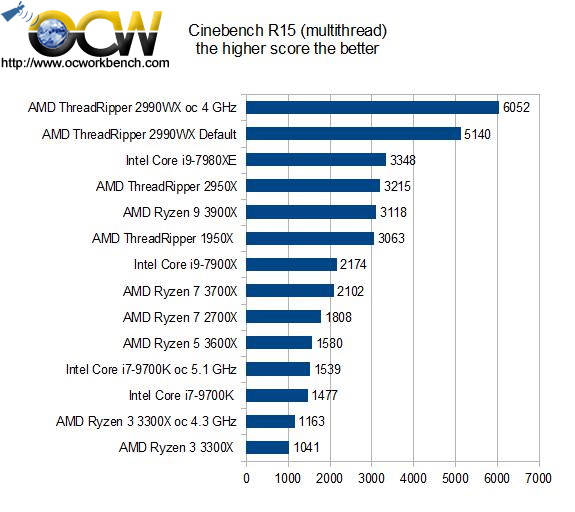
Cinebench R15
Cinebench R20
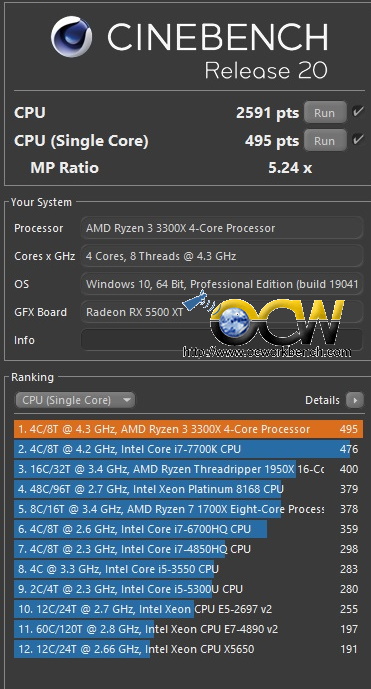
Among the 4C/8T, the most apparent numbers we can see is that the Ryzen 3 3300X can go on par with the Core i7-7700K processor.
In fact, the Ryzen 3 3300X is on par with the Intel counterpart, it’s single core performance too can match if not better than the Intel’s equivalent processor.

SiSoft Sandra 2018
It is more or less expected the results that the Ryzen 3 3300X is a lower end processor which may not be as fast as it’s previously launched 3000 series processors. It is good to note that the performance when overclock it close to what the once champion core i7 9700K achieved.

Blender 2.79b
Blender benchmark 1.0b2 runs the test against the processor to render the image. This tool can be used to analyse the processor performance.
In this render test, the benchmark time required to complete the render. The faster (shorter time taken) the better.
This may not be a fair comparison as we are comparing a low end Ryzen 3000 series with the mid and high end processors. Well, if you are for modelling and rendering, you might need a better Ryzen processor.

PovRay
PovRay is another test we used for testing the processor capabilities. In this test, we check out the single and multi thread performance.
Again, the Ryzen 3 3300X is expected to perform slower than the Ryzen 5 3600X but it is not as fast compared to the Core i7 9700k

PCMARK 10
PCMark 10 test the 3 different groups of applications that are commonly used on desktop PCs. Essentials, Productivity and Digital Content Creation.
The score of 5659 and 5689 put it on pair with the performance of the Threadripper 1950X and is faster than that of a Core i9-7900X. This is quite a pleasant surprise.

3DMARK Firestrike Physics (fps)
Futuremark Firestrike Custom Physics test takes the processor test to see how fast it runs.
It is quite interesting to see that the Ryzen 3 3300X is really way slower then the Ryzen 5 3600X. At a fraction of the price, I think we have to be realistic about it’s performance against the more expensive processors.

In the BIOS, the memory option allows us to choose the memory timings used for the installation. To simply things, we usually will choose XMP Profile. In this case, the Gigabyte LED modules has a setting of DDR4-3200, CAS 16, 18,18-1T timings.
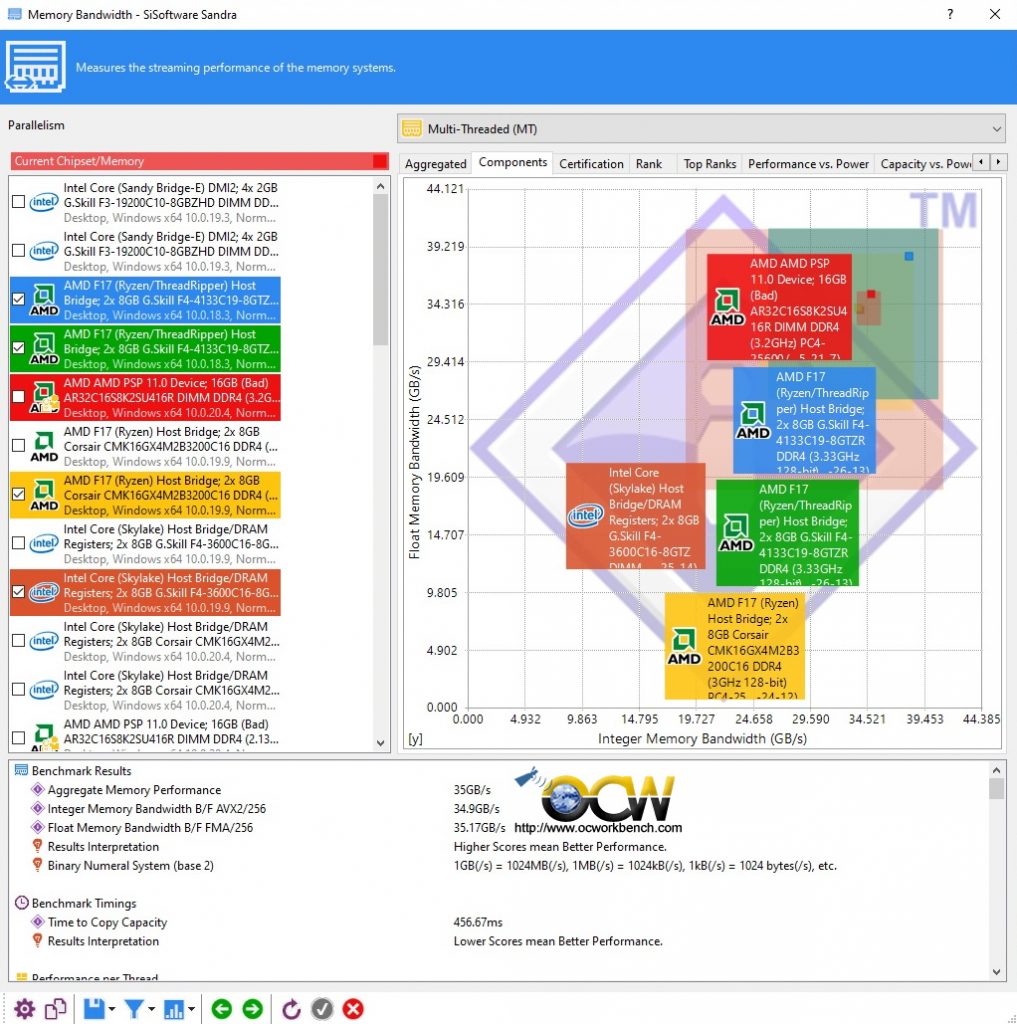
Other than overclocking the processor, we can also improve overall performance by increasing the bandwidth by overclocking the ram module. In our test, we can get it to run up to 3800 MHz and benchmarks did not fail.
Here are two screen shots of memory bandwidth test using SiSoft Sandra 2018 before and after tweaking it from XMP Profile to 3800 MHz. Do note that the CAS Latency is automatically adjusted down to CAS 26 with clocks of 26-26-1T

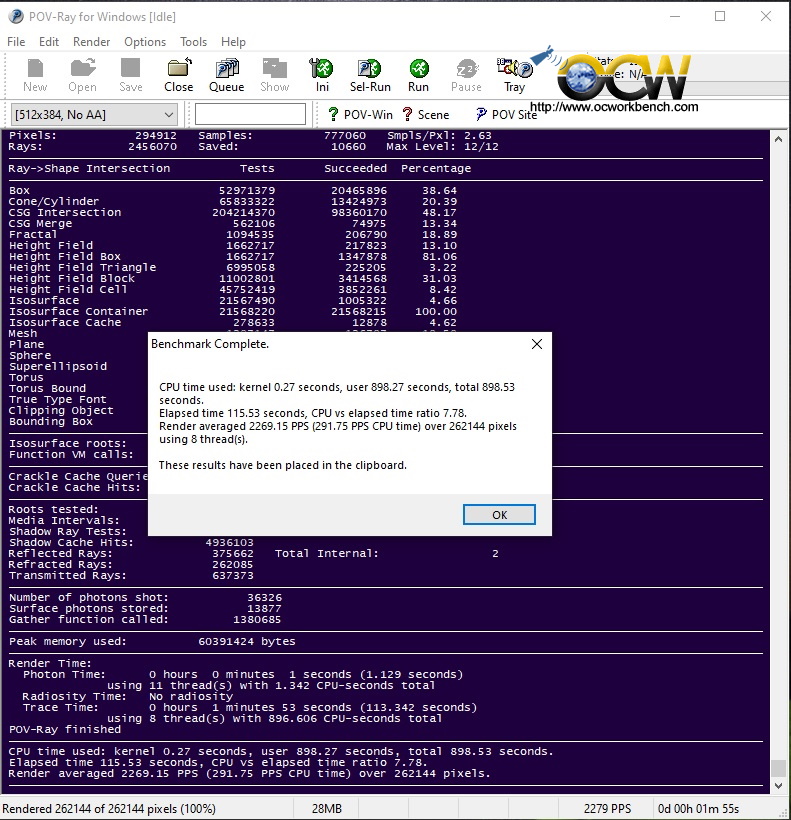
POV Ray for example scored 2235.71 pps (multicore) and 287.01 pps (single core). When the memory is tweaked higher, the scores improved to 2269.15 (multicore) and 295.75 pps (single core).
Conclusion
Are you buying into the future ? Yes, I would say so as it promises support for the Zen 3 architecture processors (to be launched).
On first sight, I was quite surprised that a B550 chipset motherboard to come with so many high end features. In fact, the B550 is an improvement over the B450 but it’s specification is very similar to the X570.

I like the idea of NVME PCIe M.2 and the WIFI 6 802.11ax a lot. That really speeds up the overall experience be it downloading (without dangling cables) or doing video files transfer.
I am a bit skeptical about the 2.5 GbE LAN port though. Do you really need that unless all your network devices also support the 2.5 GbE. If you really need that speed, available devices are Netgear’s Nighthawk Tri-Band AX12 router or NAS like the Buffalo TeraStation 3220 2-Bay NAS Drive.
Installation is easy. Just plug everything, power up, go into BIOS and load optimized default. Overclocking wise, the processors all can do a 4.3 GHz on air. Anything beyond really depends on luck and tuning. The multiplier options are readily available in the BIOS for you to choose from. Voltage levels etc. you can even fine tune other parameters like memory to 3800 MHz.
Performance wise, the low end Ryzen 3 3300X performed pretty well with the B550 board. There also shouldn’t be any material difference between B550 and X570 chipset if paired with the same processor and memory modules.
In Conclusion, this board has a lot of features built in, e.g. WIFI 6, 2.5 GbE etc. To tap on all this power, you will also need equivalent router to support it. Likewise, for faster data throughput, an investment into the PCIe 4.0 NVME is necessary to tap the power of B550. Thus, owning the board is the first step into the future. This board is priced at SGD 505 (SRP) which is slightly cheaper than it’s X570 equivalent.
Pros
- PCIe 4.0
- 2.5 GbE LAN port
- WIFI 6 802.11ax
Cons
- Documentation
- Pricing
Ratings
Here are my ratings out of 10 stars.
| Category | Score |
| Performance | 10 / 10 |
| Features | 10 / 10 |
| Ease Of Installation | 10 / 10 |
| Overclocking Features | 10 / 10 |
| Documentation | 9 / 10 |
| Packaging | 8 / 10 |
| Overall Rating : | 9.5 / 10 |
