

Introduction
12 Oct 2020
AMD has been in the forefront in desktop PC processors but lesser known in the notebook space. Today, we are going to review the HP ProBook x360 435 G7 Notebook PC 2-in-1 convertible. This notebook weighs 1.45kg and has a dimension of 30.85 x 22.29 x 1.79 cm. This 13.3″ Windows 10 notebook is powered by the AMD Ryzen 4700U APU.


The onboard memory is a 16 GB single channel SO-DIMM which has another slot for expansion. The onboard graphics is the AMD Radeon graphics within the APU.
In terms of storange, it has a 1.0 Terabyte of SK Hynix NVME storage which runs at amazing speed.
For connectivity, on board is a Intel dual band wireless AC 9260 802.11ac and Bluetooth 5.0.
On the side of the notebook, you can find 2 USB 3.1 Gen 1, 1 USB Type C connectors, 1 headphone microphone combo, 1 HDMI 1.4b connector. There is also a microSD slot.


There are two webcams, the 720p HD cam is user facing while a 5 MP is mounted on the keyboard and can act as the rear camera when it is in tablet mode.
The package comes with a HP Smart 65 watt external AC power adapter for charging the 3 cell 45 Wh Li-on Battery. It takes around 2 hrs 20 minutes to fully charge the battery to 100%. the battery life can be up to 17 hours and 15 minutes.

As it is a convertible you can switch it between desktop mode or tablet mode easily. The set we have comes with a stylus which comes handy for writing notes while in tablet mode.
In the next few pages, we will look at it’s performance
[nextpage title=”Unboxing of the Notebook”]
Unboxing Video
[nextpage title=”Benchmarks”]
Benchmarking
CPU-Z
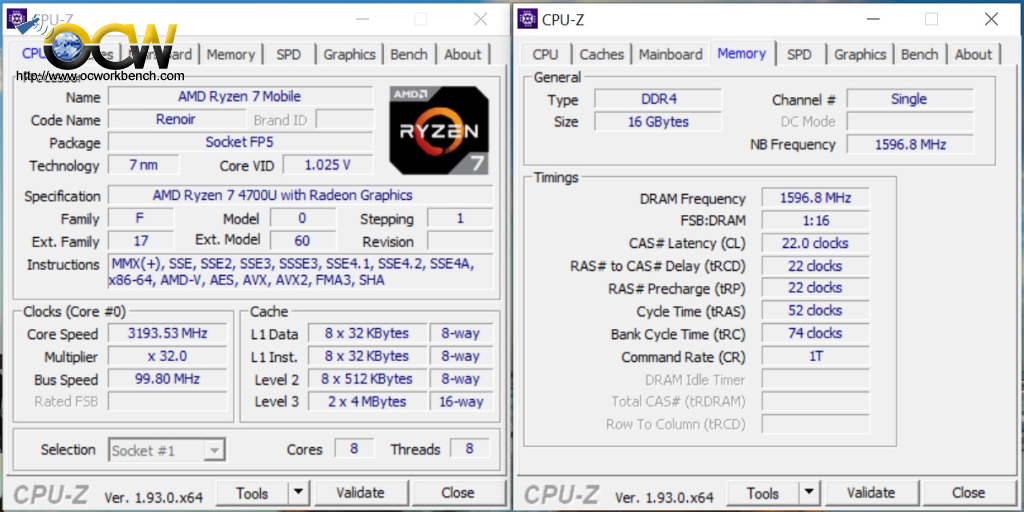
The processor in the HP notebook is a Ryzen 7 4700U mobile processor with Radeon Graphics. It runs at a clock speed of up to 4.1 GHz. Usuallly it clock to a lower multiplier but will go into Turbo mode to 41x.
IN terms of memory, the set comes with 1 single channel SO DIMM running at DDR4-3200 at CAS 22, 22, 22, 74- 1T cmd. Speed could be improved if a pair of RAM is ran in dual channel by adding another SODIMM.
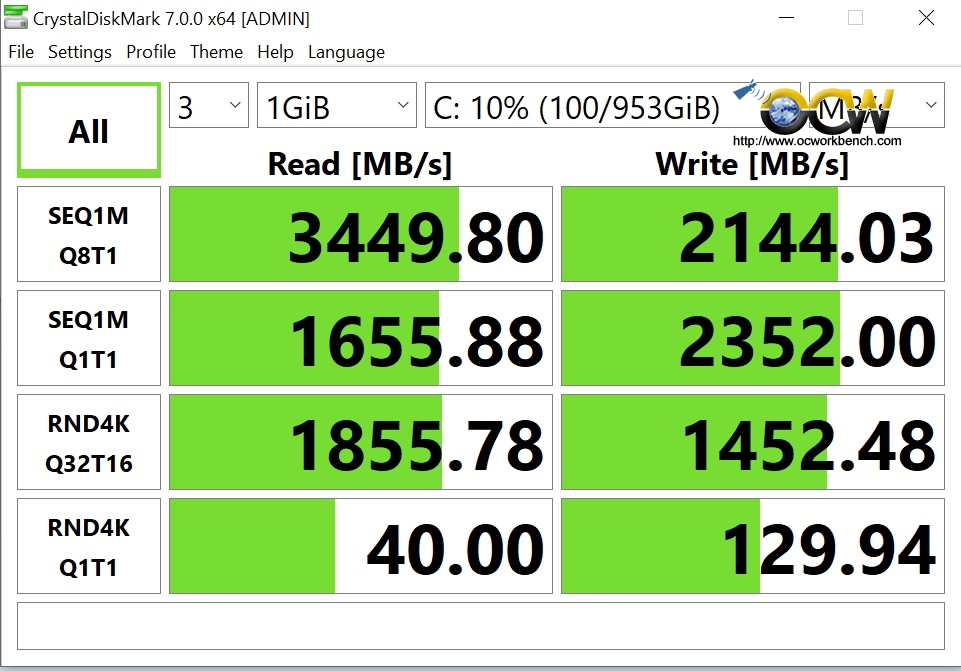
The onboard sorage is a PCIe gen 3 NVME Memory module which at an amazing speed of 3449 MB/s in squential READ and 1244 MB/s in write. A typical PCIe Gen 3 can do a read of 3500 MB/s and write of 3500 MB/s. A typical PCIe Gen 4 is capable of doing 4900 and 4200 in read and write. Reference
PCMARK 10
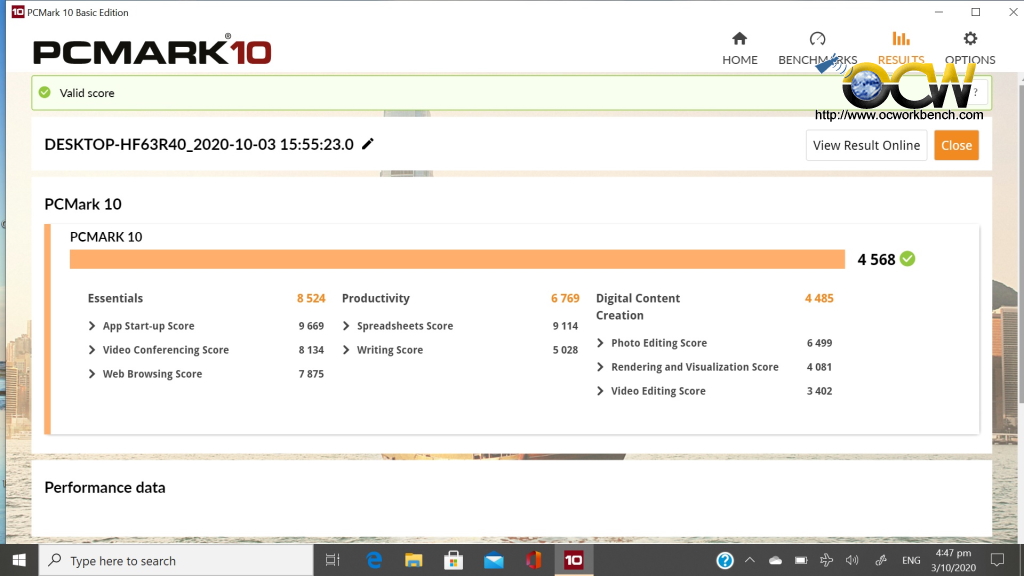
With a score of 4568, the notebook is comparable to an Intel Core i7-1065G7 based notebook running Intel Iris Pro Graphics 10th Gen Mobile that scored 4595 in this test.
So in terms of Digital content creation, the AMD notebook should work as hard as the Intel counterpart.
3Dmark
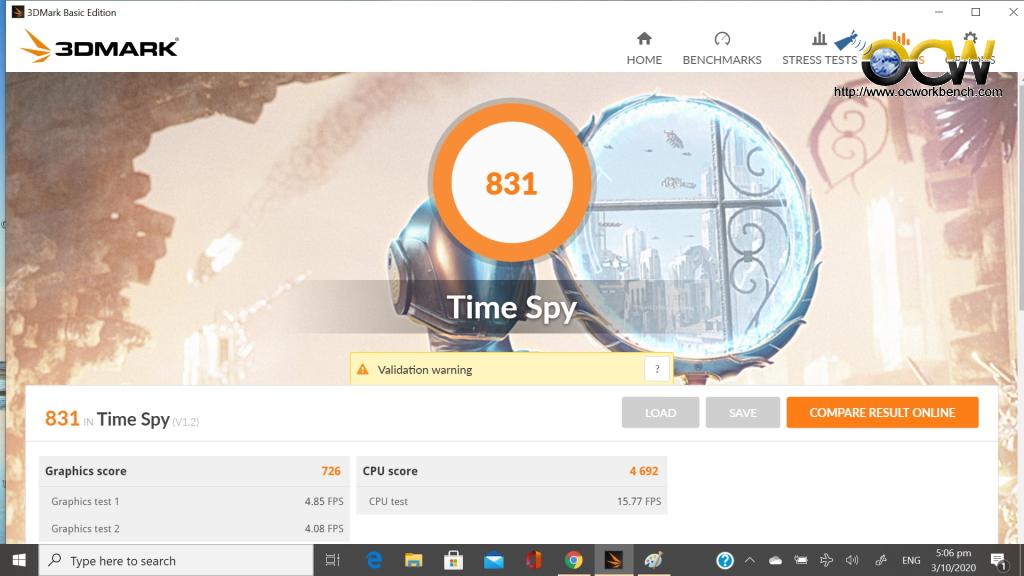
What about 3Dmark result of 831 ? Compared to the same Intel processor Core i7-1065G7 with IRIS PRO graphics 10th Gen, the AMD Ryzen 4700U graphics has catching up to do. The difference is around 12% with a score of 945.
[nextpage title=”Conclusion”]Conclusion
The ProBook x360 435 G7 powered by AMD Ryzen 7 4700U exhibits pretty good stability and performance thoughout our days of usage. As a notebook that targets SMEs, 3D graphics is not the main focus but the raw power to perform content creation is there for the users.
In comparson to a 10th Generation Intel notebook, the performance is almost on par. This could be due to the fact that the notebook only came with a single SODIMM and it was run in a single channel DDR mode.
In terms of features, this notebook features HP SureStart for BIOS protection which is indeed a good thing to have to protect against the BIOS from being tempered. The PCIE based 1.0 Terabyte of SK Hynix NVME storage make it easy to edit 4K video without lags as it’s read speed is amazingly fast. The on board Intel dual band wireless AC 9260 802.11ac allows one to upload youtube videos to at a faster rate than non AC router.
For faster transfers of images and video, there is USB-C port and a microSD slot. It is a pity that it did not include a LAN port and 4G capability (for mobility).
Installation is pretty straightforward. When booted for the first time, you will have to go through all the WIndows standard questions and connect to WIFI for latest updates. Everything is pretty smooth sailing, just that it takes some time for it to be set up for the first time use. Packaging is rather simple which came a simple setup instruction.
Most people will be worried about the hinge. I find it quite sturdy when flipping it over to use it as a huge tablet. In Tablet mode, the screen is responive to touch. It is all about getting used to the tablet interface of Windows 10 as I still prefer to type on the keyboard.
As for battery life, it can last me for 2 days without a recharge (that depends on what you do with it).
In Conclusion, HP has made an affordable business notebook that works well in it’s thin, lightweight and solid sturdy aluminium design. So, what are your thoughts about this notebook?
Pricing starts from S$1729. A similar configuration but lower processor of Ryzen 5 4500U starts from S$1599.
Comment below.
Here are my ratings out of 10 stars.
| Category | Score |
| Performance | 8 / 10 |
| Features | 10 / 10 |
| Ease Of Installation | 10 / 10 |
| Overclocking Features | NA |
| Documentation | 7 / 10 |
| Packaging | 7 / 10 |
| Overall Rating : | 8.3 / 10 |